
ZUS - Save Car Expenses
No NDA IncAuto & Vehicles
4.72.90K Reviews
- Version
- 8.20.5
- Installs
- 500.00K
- Age Rating
- Everyone
Screenshots
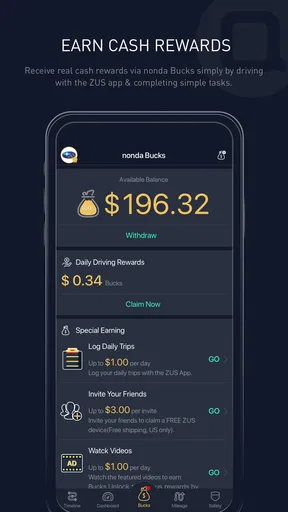
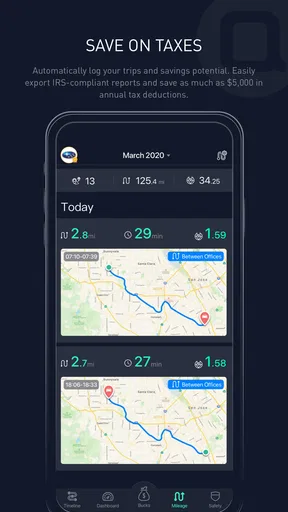
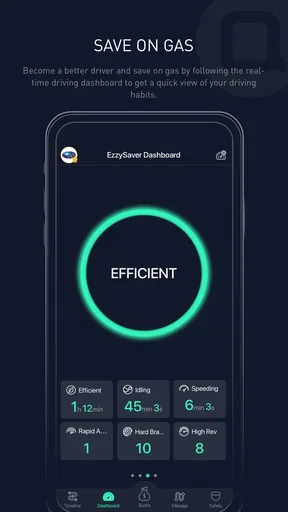
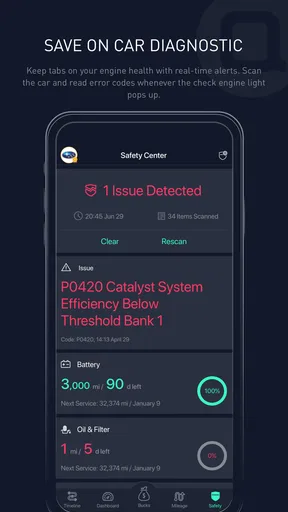
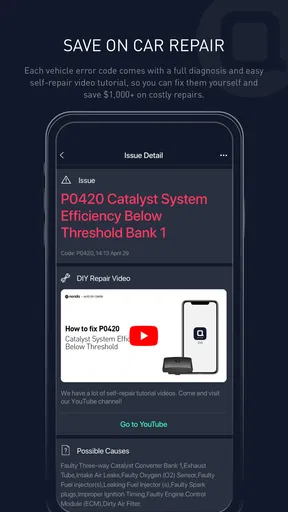
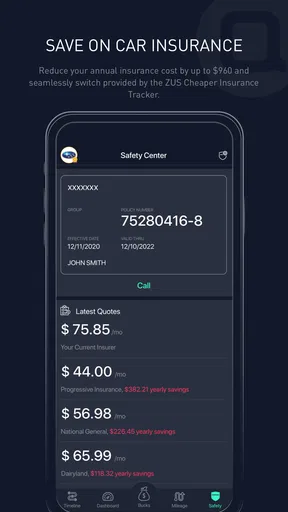
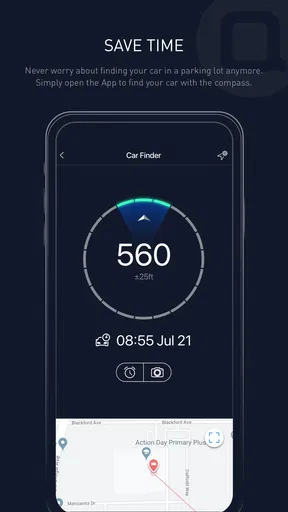
Our Review of ZUS - Save Car Expenses
 Analysis by Appyee
I like the idea of a car app most when it takes a task I already avoid—keeping track of spending—and makes it easy enough to do in the moment. ZUS - Save Car Expenses is aimed at that everyday problem, bringing vehicle-related records and connected-car tools into one place. In my view, its appeal depends on how you use it: it can be a practical home for routine car costs, while some of its more ambitious features depend on having compatible ZUS hardware and a reliable connection.
When a connection matters
The app’s connected features make connectivity part of the experience rather than a background detail. A vehicle dashboard, trip information, parking location, or readings from a ZUS smart charger are most useful when the phone, app, and relevant device can exchange information. That can be convenient when everything is working, but it also means I would not treat a live reading as a substitute for checking the car directly if something seems wrong.
For expense logging, the practical question is different: can I record a purchase while I still have the receipt and remember what it was for? A connected feature may be the main attraction for one driver, while another may care more about having a consistent record of fuel, repairs, and other costs. I would judge the app by whether it fits the second habit even on days when I do not use the connected tools.
Useful in the car, but not while driving
A realistic routine is to add a fuel purchase after pulling away from the pump and parking safely, or to enter a repair bill when I get home. That small delay matters: expense records are only helpful if I can add them without distracting myself on the road. A parking-location tool is similarly best used after I have parked, not as a reason to handle the phone while moving.
For someone who drives for work, a mileage record can reduce the end-of-month scramble to reconstruct trips from memory. I would still make a habit of checking that the records are complete before relying on them for reimbursement or personal bookkeeping. Automated tracking can save effort, but it is worth reviewing entries rather than assuming every trip has been captured exactly as needed.
If a reading or record seems missing
Connected tools can be affected by ordinary interruptions: a phone may not be communicating with a device at the moment I expect, or I may simply forget to enter a receipt. My practical recovery routine would be to reopen the relevant screen when I am safely parked, check the connection and device setup, and add a missing expense manually if that option is available. For anything important, keeping the original receipt until I have checked the entry gives me a simple backup.
This is also why I would avoid making the app the sole record of a work-related mileage claim or a significant repair. It can make organization easier, but a quick review and a separate copy of important paperwork provide sensible protection against omissions. That extra check is a trade-off: it takes a little time, yet it helps prevent a tidy-looking dashboard from creating false confidence.
Use it without turning car data into a chore
I find a lightweight routine more realistic than trying to catalogue every detail immediately. I would record expenses as they happen, choose categories that make sense for my budget, and review the totals periodically. If I already track spending in a finance app or spreadsheet, I would first decide which system is the main record; entering the same purchase twice is an easy way to abandon both systems.
Drivers who are mindful of mobile data can reserve deeper reviews for a trusted connection and use the app when they need to enter or check something specific. I would also consider whether I want trip-related tools active as part of my everyday setup, rather than enabling every feature simply because it is available. The useful balance is enough tracking to answer practical questions—where costs are going, what needs attention, and whether a record is complete—without making every journey an administrative task.
First Impressions and Setup
Setting up ZUS - Save Car Expenses was surprisingly smooth. After downloading the app from the store, I was greeted with a clean and intuitive interface. It’s like the app developers knew exactly what I needed—a clutter-free experience. The setup wizard guides you through connecting your vehicle using the ZUS smart car charger (if you have one) or entering your car details manually. Either way, it’s a breeze.
Once you're in, the app opens up a dashboard that gives you an overview of your car’s health, expenses, and mileage. It’s like having a personal assistant for your car, minus the cost of hiring one.
Tracking Expenses
One of the standout features is the expense tracker. You can log every penny spent on your car—from fuel to repairs. Inputting expenses is as simple as snapping a photo of the receipt or entering the details manually. What I appreciated here is the ability to categorize spending, making it easy to identify where your money is going. It even generates neat reports that you can review or share, handy for budget planning or tax season.
The most useful way I found to approach those categories is to keep them stable over time. If I label one oil change as maintenance and the next as repairs, the history becomes harder to interpret even though both entries are saved. I would choose a small set of labels that matches how I think about costs, then use the reports to spot patterns rather than expecting them to explain every purchase automatically.
Receipt capture can help when a paper slip is easy to lose, but I would still check that the important details have been recorded correctly. A quick note about what the charge covered can be more useful months later than a photo alone, especially for a repair involving several parts or services. For a household with more than one vehicle, keeping each record associated with the right car is another worthwhile habit before building a long expense history.
Smart Features
ZUS isn’t just about tracking expenses. It packs a punch with features like a mileage log, which is especially useful if you’re someone who needs to track miles for work. The app automatically logs your trips, so you don’t have to fiddle around with manual entries. It’s all about making life easier. Additionally, there’s a parking location tracker—no more wandering around parking lots looking for your car!
Those tools suit different kinds of drivers. A commuter may value a mileage history, while someone who parks in unfamiliar places may get more immediate use from remembering a parking spot. If I use mileage for work, I would review the log on a regular schedule and separate business journeys from personal ones while the details are still fresh. That small check is more dependable than trying to sort a month of trips in one sitting.
For those who use the ZUS smart charger, the app offers real-time data on your car’s battery health, tire pressure, and more. It’s like having a mechanic in your pocket, alerting you before issues become expensive problems.
I would treat those readings as an early prompt to investigate, not a diagnosis. A warning can tell me that something deserves attention, but it cannot replace a proper inspection when the car behaves unusually or a safety concern appears. The connected setup may be worthwhile for a driver who wants this extra visibility; someone who only needs a simple expense ledger may find that manual tracking covers the main need without adding hardware.
User Experience and Design
Let’s talk about the design. The app is visually appealing with a sleek, modern look. The navigation is intuitive, with everything you need just a tap away. The developers have done a stellar job creating an app that looks good and functions seamlessly. It’s not just about aesthetics, though. The performance is solid—no lags, no crashes, just smooth sailing.
That straightforward feel matters because car records are rarely a one-time project. The value grows when I can return to the same place after a service visit or fuel stop, rather than searching through email, paper receipts, and unrelated notes. Still, an app with several vehicle tools can take a little exploration before I know which screens I actually need. I would start with expenses and the one connected feature I care about most, then add more only if they earn a place in my routine.
ZUS is a free app in the auto-and-vehicle category, made by No NDA Inc. It has a 4.7 average from around 14,000 ratings, and more than 500,000 installs. Its Everyone age rating makes it broadly accessible, while optional in-app purchases range from $0.99 to $29.99 per item. Those purchases are worth considering in context: I would decide whether I want the basic record-keeping workflow first, rather than assuming I need to pay to make the app useful.
The app first appeared on October 13, 2015, and its current version is 8.20.5, with Android 6.0 as the minimum operating-system requirement. That long-running presence is reassuring in a practical sense, but it does not remove the need to check that my own phone and any hardware I plan to use are compatible. If I am choosing between this and a general notes app, the deciding difference is the car-focused organization; if I want a broad personal budget tool, a dedicated finance app may suit me better.
What Could Be Better?
No app is perfect, and there’s always room for improvement. While ZUS - Save Car Expenses does a fantastic job overall, some users might find the additional hardware requirement (like the smart charger) a bit of a hurdle. However, this is entirely optional, and the app still offers great features without it.
The other trade-off is that the strongest experience may ask for more attention than a driver wants to give. Manual entries rely on remembering to make them, while connected functions rely on a suitable setup and dependable communication. If I already have a system that captures car spending consistently, switching only makes sense if ZUS’s vehicle-specific view or connected tools solve a real annoyance—not just because another dashboard looks appealing.
Compared with the usual alternatives, a spreadsheet gives me more control over columns and calculations but asks me to maintain the structure myself. A general notes app is quick for a receipt reminder yet weak at turning a collection of notes into useful categories and reports. ZUS sits between those approaches: it offers a car-centered place for records and additional connected functions, but it is not necessarily the right replacement for a full household budget or a formal business mileage process.
Another point to consider is the learning curve. While the app is user-friendly, it does have a lot of features, and it might take a little time to explore all its capabilities fully. But once you get the hang of it, you’ll wonder how you ever managed without it.
To keep that learning curve manageable, I would set it up around one immediate question: do I mainly want to see what my car costs, keep track of trips, or check information from a compatible charger? Starting with one goal makes it easier to tell whether the app is helping. A driver who rarely records expenses and does not want connected tools may be better served by a simple reminder or existing finance workflow rather than another app to maintain.
Conclusion: Is It Worth It?
In a world where managing car expenses can be a headache, ZUS - Save Car Expenses is a lifesaver. It not only helps you keep track of every dollar spent but also ensures your car is in top-notch condition. Whether you’re a car enthusiast or just someone looking to save money, this app is a worthy addition to your toolkit.
My recommendation is strongest for drivers who want car costs, mileage, and related information gathered in one vehicle-focused routine, and who are willing to review entries rather than leave everything to automation. It is less compelling if all you need is a basic list of receipts, if you dislike recording purchases, or if you expect an app reading to replace a mechanic’s judgment. The right choice depends on whether the connected and organizational conveniences solve a recurring problem for you.
If you’re tired of manual logs and endless paperwork, give ZUS a try. It’s like having a little magic wand that organizes your car life, so you can focus on the road ahead.
Ready to give it a shot? Check it out on your app store and start saving those car expenses today!
Ultimately, I see the best result coming from a modest habit: add costs soon after they happen, review mileage and reports before they matter, and treat connected readings as useful context rather than a guarantee. That makes ZUS a practical option for drivers who want a clearer picture of car ownership without turning every drive into bookkeeping. If that balance sounds right, it is worth trying; if you need a fully customizable ledger or a formal fleet-management system, another tool may fit better.
Verdict
Strengths of ZUS - Save Car Expenses
- Easy to track fuel consumption.
- Automatic trip and mileage logging.
- User-friendly interface design.
- Real-time vehicle health alerts.
- Syncs with multiple vehicles.
Limitations of ZUS - Save Car Expenses
- Premium features require subscription.
- Limited integration with other apps.
- Initial setup can be confusing.
- Some features need location access.
- Occasional connectivity issues.
Similar Picks in This Category
View All
Android Auto
Google LLC4.1

maxim — order a taxi & food
PT. SITO4.7

Штрафы ГИБДД: проверка с фото
Pays LLC – Штрафы ГИБДД4.7

Номерограм – проверка авто
Авто Ассист4.8

Дром Авто
Дром4.9

Frequently Asked Questions
What features does ZUS - Save Car Expenses offer?
ZUS provides a comprehensive suite of features aimed at helping users manage and reduce car expenses. It includes automatic mileage tracking, real-time vehicle health monitoring, parking location tracking, and expense log management. These tools are designed to help users optimize their car maintenance schedules and save on fuel costs.
Is ZUS compatible with all types of vehicles?
ZUS is compatible with most vehicles manufactured after 1996, as these typically have an OBD-II port required for the app's full functionality. However, it's always a good idea to check the specific compatibility for your vehicle model in the app’s settings or the official website before downloading.
How does ZUS help in reducing car expenses?
ZUS helps reduce car expenses by offering insights into fuel efficiency, suggesting optimal driving routes, and providing maintenance reminders. The app analyzes driving patterns and vehicle health to offer personalized tips, which can lead to significant cost savings over time by preventing unnecessary repairs and optimizing fuel consumption.
Is ZUS - Save Car Expenses free to use?
ZUS offers a free version with basic features, but to access advanced features like real-time vehicle health monitoring and premium customer support, a subscription is required. The app provides various pricing plans, ensuring users can choose one that best fits their budget and needs.
How secure is the data collected by ZUS?
ZUS prioritizes user privacy and employs robust encryption methods to secure data. The app ensures that all user information, including location and vehicle data, is stored and transmitted securely. Users can also review the privacy policy within the app to understand how their data is managed and protected.
